You haven't signed in yet, you can have a better experience after signing in
*Please complete the payment within {{receiveCouponInfo.expire_at}}Previous use*
You haven't signed in yet, you can have a better experience after signing in



Activity Rules
1、Activity time:{{ info.groupon.start_at }} ~ {{ info.groupon.end_at }}。
1、Activity time:cease when sold out。
2、Validity period of the Group Buying:{{ info.groupon.expire_days * 24 }} hours。
3、Number of Group Buying:{{ info.groupon.need_count }}x。
Please Pay Attention
1、Teamwork process: Join/initiate a Group Buying and make a successful payment - Within the validity period, the number of team members meets the activity requirements - Group Buying succeeded!
2、If the number of participants cannot be met within the valid period, the group will fail, and the paid amount will be refunded in the original way.
3、The number of people required and the time of the event may vary among different products. Please pay attention to the rules of the event.
DBeaver Ultimate is a fully functional desktop database management tool designed for individual users. It integrates deep SQL scripting, data editing, and management functions, and enhances cloud integration. You can connect to AWS, GCP, Azure, and local databases simultaneously through a unified cloud resource manager. This enables seamless cross environment visibility and control on your local computer.
main advantages
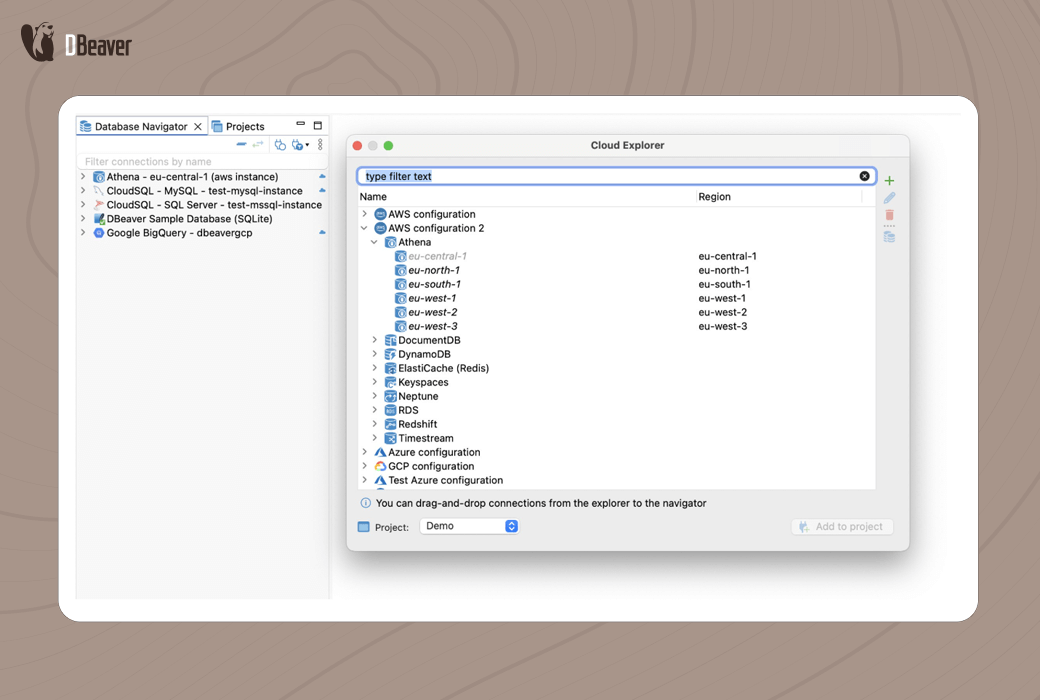
With Cloud Explorer, you can manage databases across multiple cloud providers and geographic regions. Simplify cloud database connections through centralized authentication and automatic configuration.
You can directly query CSV, XLSX, Parquet, JSON, and XML files from your local computer or cloud storage without importing. Merge data in different formats and build visual reports in one interface.
Use all the features of DBeaver Enterprise to achieve comprehensive database management. Obtain additional cloud specific tools such as Kafka integration and cloud storage management.
highlight feature
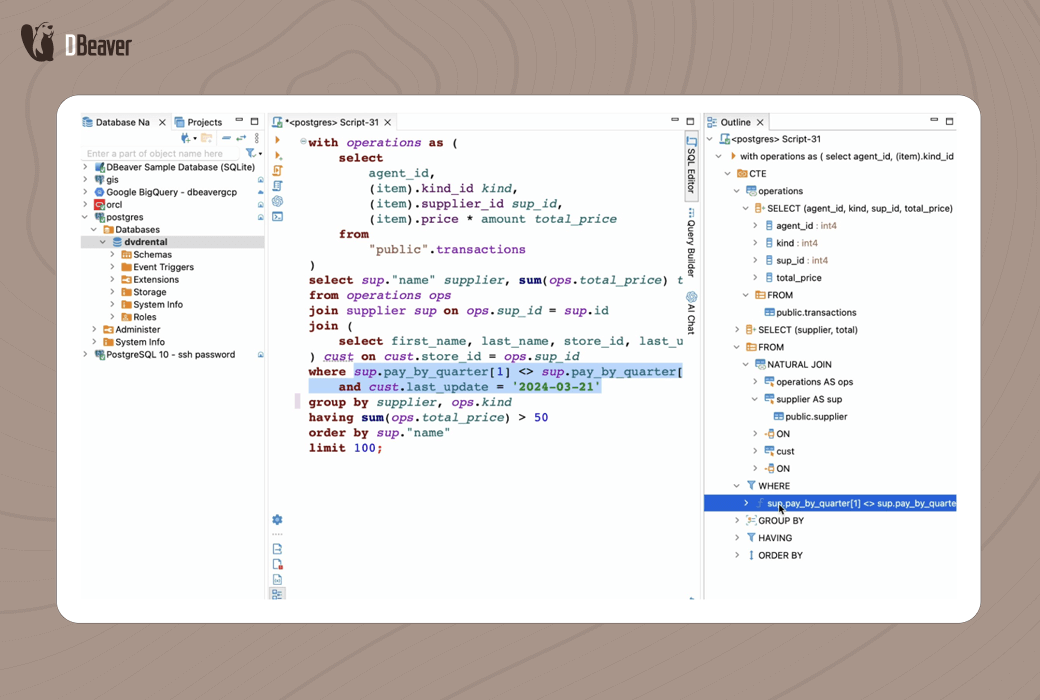
With context aware auto completion, customizable templates, and one click formatting capabilities, complex SQL script writing becomes simple. The debugger and real-time execution plan make writing and debugging complex queries quick and convenient.
By using the unified interface of DBeaver Ultimate, you can browse and manage databases in AWS, GCP, Azure, and local databases. Seamlessly switch between cloud databases and local instances.
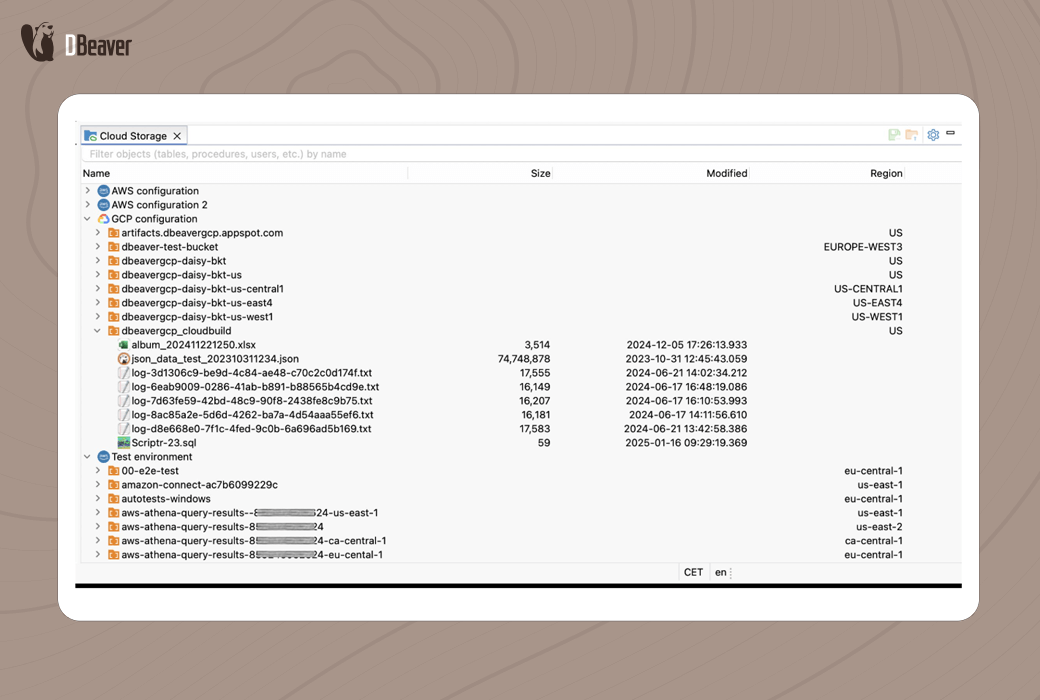
Manage cloud hosted files in AWS S3, Google Cloud Storage, and Azure Blob directly through DBeaver Ultimate's cloud storage capabilities. Local files can still be accessed through the operating system's file selector or DBeaver's built-in file dialog box.
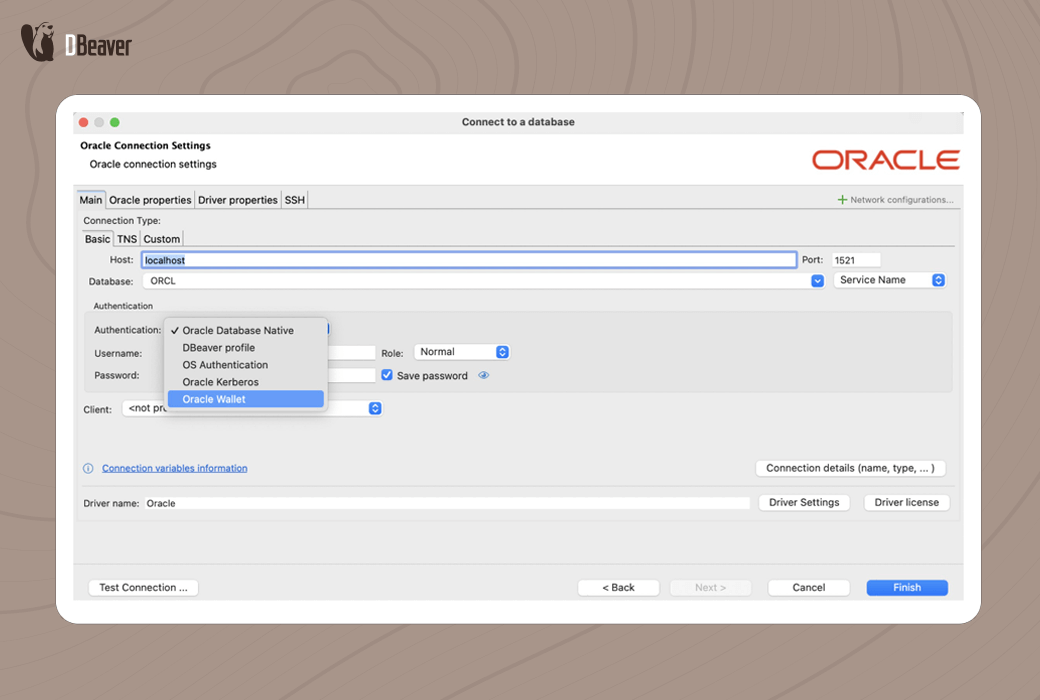
Use SSO authentication to protect database connections and securely store credentials in the Secret Manager. Master password encryption protects all cloud database connections with enterprise level security.
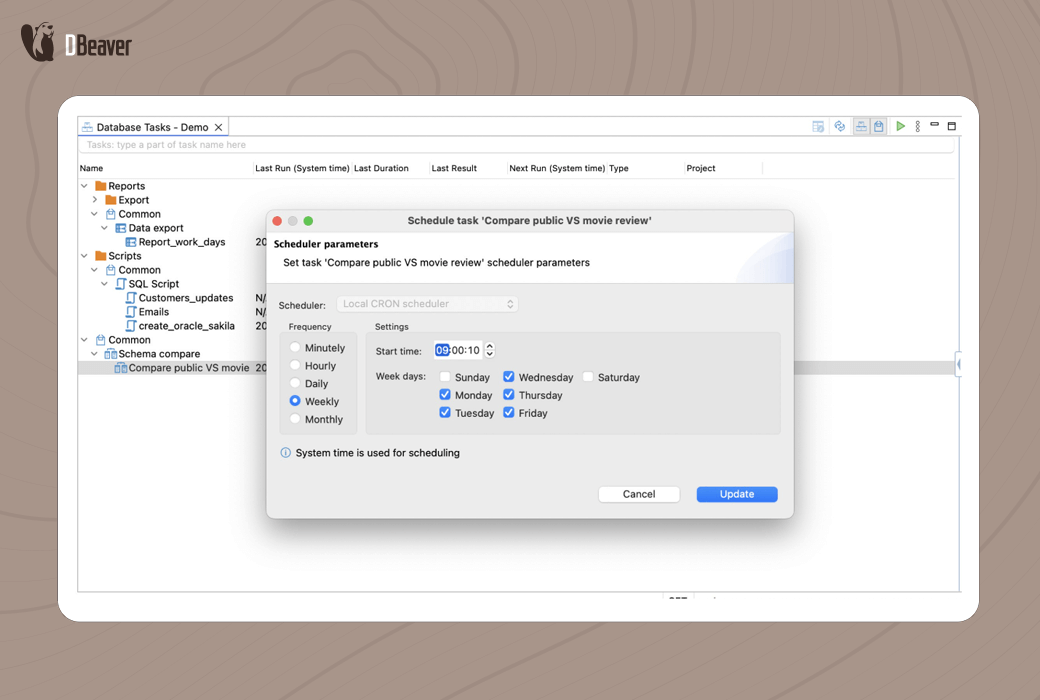
Arrange repetitive tasks such as exporting, importing, and script execution. Supports Windows Task Scheduler, cron on macOS/Linux, and command-line triggers, allowing loop jobs to run automatically with just one setup.
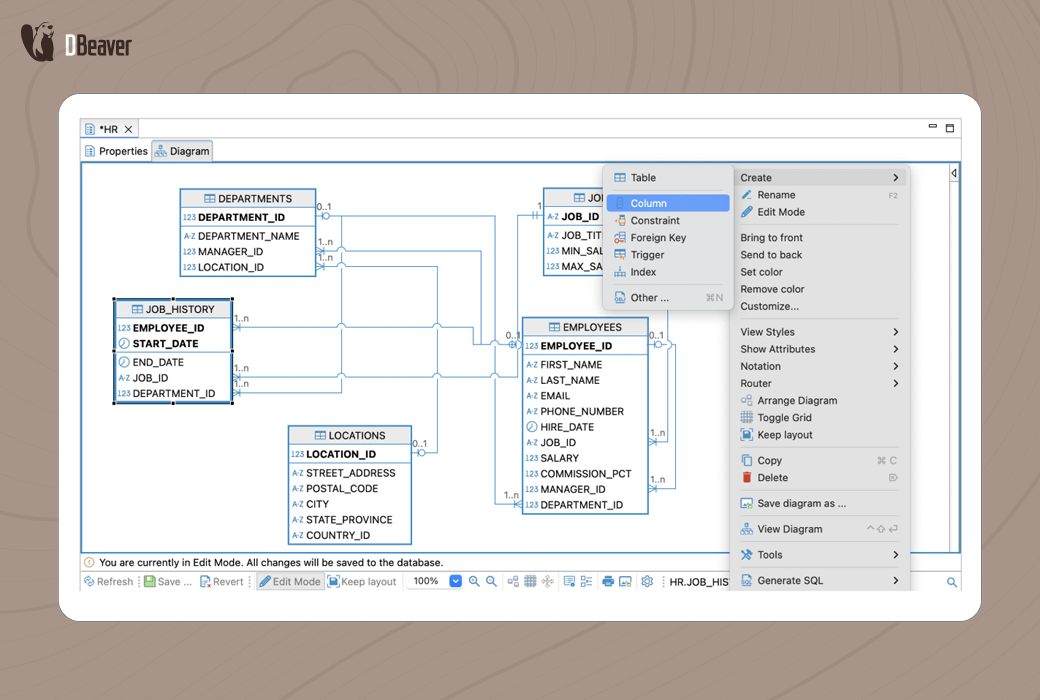
Use ER diagram to visually design database schema and support forward engineering. Create and modify tables, relationships, and metadata directly from ER diagrams. With the help of a simulated data generator, automatically fill test data that meets the requirements of the pattern into tables in multiple databases. Configure row count, batch size, and data generator for rapid development and testing.
Who are the target users of DBeaver Ultimate?
Support and database administrators
development
Senior management
Official website:https://dbeaver.com/dbeaver-ultimate/
Download Center:https://dbeaver-ultimate.apsgo.cn
Data document:https://dbeaver.com/docs/dbeaver/
Delivery time:Manual online processing
Operating Platform:Windows、macOS、Linux
Interface language:Supports Chinese interface display and multiple language options.
Update Description:Use and update within the subscription validity period.
Trial before purchase:Free trial is available before purchase.
How to receive goods:After purchase, the activation information will be sent to the email address at the time of placing the order, and the corresponding product activation code can be viewed in the personal center, My Orders.
Number of devices:Can install one computer.
Replace computer:Uninstall the original computer and remove the license in the license manager before the new computer can be reactivated.
Activation guidance:To be added.
Special note:To be added.
reference material:https://dbeaver.com/docs/dbeaver/How-to-Reassign-License/

Any question

DBeaver trial license
The DBeaver trial license is a free personal license that provides full access to DBeaver Lite, Enterprise Edition, or Ultimate Edition for 14 days. After the trial period ends, access to DBeaver will be blocked. Users will not be able to use the product or receive technical support.
You can apply for a trial license directly through the DBeaver application, or by filling out the form on the websiteApply with a specific form.
You can apply for a trial license for each new version of DBeaver product, but each version can only be applied for once.
DBeaver Early Access Program License
The Early Access Program license allows users to test pre release versions of DBeaver Lite, Enterprise Edition, or Ultimate Edition for free. The early access plan involves using early access build versions rather than stable release versions.
After the trial license expires, users can join the early access plan in the application. Afterwards, a special license key will be issued, which can only be used for early access to product versions.
As long as users comply with all restrictions, the duration of participation in the program will not be limited. DBeaver has the right to terminate or unilaterally change the plan at any time.
Participation in early access programs is voluntary; However, it requires users to agree to collect statistical data on the usage of DBeaver products.
The early access plan has the following limitations:
Each early access product version will expire one month after the build creation date. Afterwards, users need to download a new product build version from the DBeaver website.
To cancel participation in the early access program, users can delete applications on their workstations or purchase and import subscription license keys into the DBeaver License Manager. Using a regular subscription license key will automatically lift all restrictions.
DBeaver Personal Monthly Subscription
Individual monthly subscriptions provide full access to DBeaver Lite or Enterprise Edition, and offer access to new versions of products and technical support systems during the subscription period.
This subscription is only applicable to individual users. Licenses cannot be shared or redistributed among users.
A user can install DBeaver on multiple workstations, as long as these workstations are only used by the user.
During the first activation and each renewal, the workstation needs to access the Internet. Without activation, users will not be able to use DBeaver products with monthly subscriptions.
By default, subscriptions will automatically renew on a monthly basis. You can stop automatic renewal at any time in your personal account or FastSpring store. The license will remain valid until the end of the current subscription period, but you will not be charged for next month's fees. Afterwards, access to DBeaver will be blocked. Users will not be able to use the product, receive technical support, or update the product. You can cancel your subscription before the next billing cycle to maintain it. If you do not cancel the subscription, it will expire. Then you cannot cancel the deactivated subscription, but you can purchase a new one.
If you want to temporarily suspend an active subscription, you can pause it for 1-10 months. In this case, you will not be charged within the selected period and will not be able to use the product. The subscription will automatically resume at the end of the selected period. You can also restore suspended subscriptions in your personal account at any time during the selected period.
DBeaver Personal Annual Subscription
Individual annual subscriptions provide full access to DBeaver Lite, Enterprise Edition, or Ultimate Edition, and offer access to new versions of products and technical support systems during the subscription period.
Individual subscriptions are distributed by user. A user can install DBeaver on multiple workstations, as long as these workstations are only used by the user.
This subscription does not require user workstations to access the Internet. With this license, users can run DBeaver in offline mode or behind the enterprise firewall.
After the subscription period ends, access to DBeaver will be blocked. Users will not be able to use the product, receive technical support, or update the product. Before the subscription expires, you can renew to continue using the product.
DBeaver team annual subscription
A team annual subscription is a single subscription license key created for a specific number of users. It provides full access to DBeaver Lite, Enterprise Edition, or Ultimate Edition, and offers access to new versions of products and technical support systems during the subscription period.
Customers can order team subscription licenses for any number of users. Team licensing considers user names rather than the number of concurrent users. During the active subscription period, you can apply to increase the number of users through email. You can reduce the number of users before renewing next year.
DBeaver with team subscription license can be installed on a limited number of workstations based on the number of users specified in the license. Every user accessing DBeaver must be included in the team license.
DBeaver with team subscription license can also be installed on virtual machines or servers, but can only be accessed by a limited number of users.
This subscription does not require user workstations to access the Internet. With this license, users can run DBeaver in offline mode or behind the enterprise firewall.
After the subscription period ends, access to DBeaver will be blocked. Users will not be able to use the product, receive technical support, or update the product. Before the subscription expires, you can renew to continue using the product.
DBeaver Permanent License (Abandoned)
Starting from version 23.3, DBeaver no longer offers new perpetual licenses. Users with existing perpetual licenses can continue to use DBeaver Lite, Enterprise Edition, or Ultimate Edition software as long as they need it.
The permanent license extension is applicable to authorized users who have existing permanent licenses. It provides one year of access to new versions of products and technical support systems.
DBeaver Academic License
The DBeaver Academic License provides full access to the DBeaver Enterprise Edition and offers one year of access to new versions of the product. Academic users do not provide technical support.
Academic licenses are only provided free of charge to students and teachers. It is only used for academic purposes. Using this license to run software in an enterprise environment is not allowed.
If you want to obtain an academic license, you need to fill out aSpecific formsWe useUniversity emailTo verify your identity, please use your university account for the application. The official application using university email is the easiest way to obtain academic permission. If you do not have a university email, you will need to attach some documents to verify your identity, such as a photo of your student ID, a contract with your name, etc.
All applications will be manually reviewed. Usually it takes about three working days.
The academic license is valid for one year. Cannot extend existing academic license. If you want to obtain an academic license for another year, you will need to apply for a new license and reconfirm your student or teacher status.
CloudBeaver Trial License
The CloudBeaver Trial License is a free license for 5 users, providing full access to CloudBeaver Enterprise Edition for a period of 14 days. After the trial period ends, access to CloudBeaver will be blocked. Users will not be able to use the product or receive technical support.
You can fill in the form on the websiteApply for a trial license using a specific form.
You can apply for a trial license for each new version of CloudBeaver Enterprise Edition, but each version can only be applied for once.
CloudBeaver Annual Single Server Subscription
The annual subscription license for a single server provides full access to CloudBeaver Enterprise Edition and access to new versions of the product and technical support system during the subscription period.
This license applies to one server and a limited number of users. Customers can order any quantity of user licenses, but the minimum quantity is 5.
Single server licensing considers user names rather than the number of concurrent users. Every user accessing CloudBeaver Enterprise servers must be included in the single server license. During the active subscription period, you can apply via email or increase the number of users on our website. You can reduce the number of users before renewing next year.
CloudBeaver Enterprise Edition can run on any user's infrastructure: on premises deployment or in any cloud environment. The license key is imported into the server during the installation process and updated through the management panel within the application.
This subscription does not require the server to have Internet access. Administrators can use this license to run CloudBeaver Enterprise Edition in offline mode or behind the enterprise firewall.
After the subscription period ends, access to CloudBeaver Enterprise Edition will be blocked. Users will not be able to use the service, receive technical support, or update products. Before the subscription expires, you can renew to continue using the product.
CloudBeaver Multi Server Annual Subscription
Multi server annual subscription is a single license key that provides full access to CloudBeaver Enterprise Edition to a limited number of users working on a certain number of independent servers, and offers access to new versions of products and technical support systems during the subscription period.
Customers can order any quantity of user licenses, but the minimum quantity is 5. During the active subscription period, you can apply via email or increase the number of users on our website. You can reduce the number of users before renewing next year. The number of servers can only be increased through email application, and can also be reduced before renewal in the next year.
CloudBeaver Enterprise Edition can run on any user's infrastructure: on premises deployment or in any cloud environment. The license key is imported into the server during the installation process and updated through the management panel within the application.
The important limitation is that all users of the multi server license key must be named and included in the license, even if only a portion of users can access two or more servers.
User management for multi server licenses can be done on dbeaver.com and within the application itself. The license administrator must create and maintain an updated user list to provide access to these users. Multi server subscription requires the server to access the Internet in order to automatically update users within the application. If the server is not connected to the Internet, the administrator needs to import the license key to the server again.
After the subscription period ends, access to CloudBeaver Enterprise Edition will be blocked. Users will not be able to use the service, receive technical support, or update products. Before the subscription expires, you can renew to continue using the product.
CloudBeaver AWS License
The AWS adaptation version of CloudBeaver Enterprise Edition can be found in the AWS marketplace. You can install the AWS adaptation version of CloudBeaver Enterprise Edition from the AWS marketplace and try it for free for 30 days.
According to the environment settings, users can choose between hourly or annual billing options. CloudBeaver AMI is cloud managed and can be started and shut down as needed or as part of the AWS CI/CD process.
Subscription is managed by AWS Marketplace. The DBeaver team does not manage subscriptions and cannot cancel them upon request.
CloudBeaver Academic License
Academic license is a free license exclusively for students and teachers, used solely for academic purposes. Using this license to run software in an enterprise environment is not allowed.
If you want to obtain an academic license, you need to fill out a specific form. We use university email to verify your identity, so please use your university account for the application. The official application using university email is the easiest way to obtain academic permission. If you do not have a university email, you will need to attach some documents to verify your identity, such as a photo of your student ID, a contract with your name, etc.
All applications will be manually reviewed. Usually it takes about three working days.
The academic license is valid for one year. Cannot extend existing academic license. If you want to obtain an academic license for another year, you will need to apply for a new license and reconfirm your student or teacher status.
Team trial license
The trial license is a free license for one administrator, three developers, three managers, three editors, and three viewers to use for testing the team version for a period of 14 days. After the trial period ends, access to the team version will be blocked. Users will not be able to use the product or receive technical support.
You can apply for a trial license by filling out a specific form on the website.
You can apply for a trial license for each new version of DBeaver Team Edition, but each version can only be applied for once.
Team Edition Single Server Annual Subscription
The annual subscription license for a single server provides full access to DBeaver Team Edition and access to new versions of the product and technical support system during the subscription period.
This license applies to a server and a limited number of users with different role types: administrators, developers, managers, editors, and viewers. Customers can order any number of user licenses, but the minimum number of users is 3, of which one must be an administrator.
The team version single server license considers user names rather than the number of concurrent users. Every user accessing the DBeaver Team Edition server must be included in the single server license. During the active subscription period, you can apply via email or increase the number of users on our website. You can reduce the number of users before renewing next year.
The license key is imported into the server during the installation process and updated through the management panel within the application.
This subscription does not require the server to have Internet access. Administrators can use this license to run DBeaver Team Edition servers in offline mode or behind the enterprise firewall.
After the subscription period ends, access to DBeaver Team Edition will be blocked. Users will not be able to use the service, receive technical support, or update products. Before the subscription expires, you can renew to continue using the product.
Team Edition Multi Server Annual Subscription
Multi server annual subscription is a single license key that provides full access to DBeaver Team Edition to a limited number of users (with different role types: administrators, developers, managers, editors, and viewers) working on a certain number of independent servers, and provides access to new versions of the product and technical support system during the subscription period.
Customers can order any number of user licenses, but the minimum number of users is 3, of which one must be an administrator. During the active subscription period, you can apply via email or increase the number of users on our website. You can reduce the number of users before renewing next year. The number of servers can only be increased through email application, and can also be reduced before renewal in the next year.
The license key is imported into the server during the installation process and updated through the management panel within the application.
The important limitation is that all users of the multi server license key must be named and included in the license, even if only a portion of users can access two or more servers.
User management for multi server licenses can be done on dbeaver.com and within the application itself. The license administrator must create and maintain an updated user list to provide access to these users. Multi server subscription requires the server to access the Internet in order to automatically update users within the application. If the server is not connected to the Internet, the administrator needs to import the license key to the server again.
After the subscription period ends, access to DBeaver Team Edition will be blocked. Users will not be able to use the service, receive technical support, or update products. Before the subscription expires, you can renew to continue using the product.
The above information is compiled and translated from the official website:https://dbeaver.com/license-types/